Contents

Searching Data

Beagle offers a few tools for you to search through the data that you have indexed. First make sure that beagled (the Beagle daemon) is running. Then ensure that you have indexed your data.

Search Syntax

Beagle supports a search syntax similar to the major search engines you are probably familiar with. If you see too many results for a query, consider refining your search.

  • Required words: By default, Beagle will return results containing all of the words you specify, with the exception of common "stop words" such as "a", "the", and "is".
  • Phrases: To search for specific phrases (one word next to another), place the words in quotation marks. For example:
"White Album"
  • Partial words: Beagle supports partial word searches using asterisks as wildcards. For example, to find words like "black", "blackbird", and "blacksmith":
black*
  • Excluding words: To exclude a word or phrase from your search, prefix it with minus sign ("-"). For example, to find items with "Beatles" but not the word "George":
Beatles -George
  • Optional words: To indicate that the word A or word B be in results, use OR, i.e. to find items which contain either "George" or "Ringo" (or both). The OR is case-sensitive.
George OR Ringo
  • Date queries: (Added in 0.3.0) Beagle allows querying for items with a particular date or within a date range. The queries look like
date:d1 On date d1
date:d1-d2 From date d1 to d2, both inclusive
date:-d2 On or before date d2
date:d1- On or after date d1
where, d1 and d2 are specified as
  • Year with 4 digits
date:2007 denotes year 2007
  • YearMonth with 4 digits year, 2 digits month
date:200612-2007 denotes the range December, 2006 to end of 2007
  • YearMonthDate with 4 digits year, 2 digits month and 2 digits date
date:-20050119 denotes any date on and upto 19th January, 2005
  • Searching file extensions: You can use either *.mp3, .mp3 or ext:mp3 to search for documents by file extension. (In this example, MP3s.)
  • Uri queries: You can retrieve all indexed metadata about a particular URI. For file paths, remember to correctly convert it to a URI (by escaping certain characters and using file:// as the prefix). This can be used for any URI indexed by beagle e.g. URIs for email results, for browsing history, for notes etc.
uri:file:///home/user/somefile
uri:http://beagle-project.org
uri:knotes:///abcd
  • Property queries: By default, Beagle looks for your search terms in the text of the documents and their metadata. If you want to search for a specific property, use the format property:keyword. Property queries follow all the rules mentioned above; so you can search for properties by phrase, using wildcards, exclude terms, or provide optional terms. For example, the following query will return all of your Beatles MP3s or Ogg/Vorbis files that aren't on the Abbey Road album:
artist:Beatles ext:mp3 OR ext:ogg -album:"Abbey Road"
Beagle allows additional filters and backends to be written as plugins. These plugins might define additional properties for querying. You can find a list of supported properties by running beagle-query --keywords. Here are some of the properties defined in beagle:
property applies to description
title Document Title of document, mapped to dc:title e.g. title tag of HTML files
creator Document Creator of the document, mapped to dc:creator e.g. creator of PDF files
author Document Author of the document
summary File Brief description of the content, mapped to dc:subject
artist Music file Name of artist
album Music file Name of album
genre Music file Genre of music
mailtoaddr Email Email address of receipient
mailto Email Name of receipient
mailfromaddr Email Email address of sender
mailfrom Email Name of sender
mailinglist Email Id of mailing list e.g. <dashboard-hackers.gnome.org>
speakingto Chat Speaker
email Addressbook Email address
imagetag Image file IPTC keywords and F-Spot, Digikam image tags
imagecomment Image file Comments and descriptions found in image including IPTC caption, Exif comment
imagemodel Jpeg image Model of camera e.g. EOS2D
inarchive File Use inarchive:true to search in archive contents
inattachment Email Use inattachment:true to search in email attachments
pkggroup Package Group to which the package belongs e.g. Configuration
filename Files Complete name or a word in the name of the file
The above properties are really the shorthand names for internal beagle properties. While some of the internal beagle properties are mapped to nicer names and can be used in the manner above, to query for any beagle property, use the following syntax. Note that this requires you to know the exact property name (e.g. see the output of beagle-query --verbose for the property names) and whether the property is a keyword or text property (which can only be obtained by reading the source file, thus making this feature a really advanced and internal one).
property:name=value (for text property)
keyword:name=value (for keyword property)

You can add custom shortname hands by editing the file /etc/beagle/query-mapping.xml. See [1] for the shipped mapping file.

  • Improving search scope: Beagle indexes data of different kinds and from various sources. If you are getting too many results, you can improve the scope of your query by specifying the type or origin of the results. The syntax is similar to Property query. The meaning of source, hittype, filetype, mimetype is explained in Search Results.
keyword description
source Source of the content e.g. source:EvolutionDataServer to search in EDS calendar and contact entries
type Hittype of the content e.g. type:IMLog to search in chat logs
filetype Specific type for file results e.g. filetype:image to search in image files
mimetype Mimetype of the content e.g. mimetype:text/plain to search in files with mime-type text/plain
  • Searching in the path: This feature is data source dependent. For backends indexing web data, this will allow searching for a word in the URL. For the filesystem backend, this will allow searching in the files in any directory with the query word as part of its name. If the full path is used for the filesystem backend, then only that particular directory will be used. In either case for the filesystem backend, the search is only in directory with the matching name or path and is not extended to its subdirectories.
inuri:google
inuri:pictures
inuri:file:///home/user/download/pictures
Expressions for date queries, extension queries, property queries, uri queries, inuri queries and limiting search scope can be used with - (to exclude all hits matching that expression) and OR (optional matching).

Stemming

Search terms are "stemmed", meaning that a search for "dance" will also match documents containing the words "dances", "dancing", and "dancer".

Search Tools

beagle-search

beagle-search is a GNOME-based user interface for searching with Beagle. To use beagle-search, simply type your search into the entry box.

Image:BeagleScreenie_crop.png

beagle-query

beagle-query is the command-line tool for searching Beagle.

Simply replace search in the line above with what you would like to search for and the beagle-query tool will bring back its results. The search expression follows the search syntax described above. Note that, phrase queries need to be \"explicitly quoted\" to avoid being interpreted by the shell. Common options:

  • --max-hits: Specify the maximum number of results (per backend) to return. The default value is 100.
  • --verbose: Show all information about hits, not just their URLs.
  • --live-query: Run continuously, printing notifications if there is a new result matching the query or if some result got removed.
  • --keywords: Lists the keywords that can be used.

Web interface

There is now an experimental Beagle Webinterface for querying and some basic controlling operations.

You can now add beagle as a firefox search engine. Ensure that you enable network web interface while configuring beagle.

Historical interfaces

The following are older ways of accessing Beagle, and are no longer used.

Best

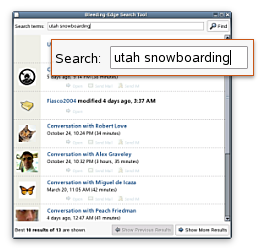
Best (acronym for Bleeding Edge Search Tool) was a Mozilla Gecko-based graphical search tool which shipped with Beagle from the first release until the release of 0.2.0. With the release of 0.2.0 it was replaced by beagle-search. The code is no longer built or included with Beagle, but is still available for historical reference in Subversion.


This page was last modified 13:52, 19 July 2008. This page has been accessed 97,921 times.

  
MediaWiki

Copyright © 2004-2007